Copy the following code into a Notepad file and save it as Lockbit 3.0.yara. This Yara rule will help you detect Lockbit 3.0 ransomware attacks.
rule Lockbit3Detect_via_SectionPatterns {
    meta:
        description = "Detects new Lockbit 3.0 variants"
        reference = "https://wazuh.com/blog/detecting-lockbit-3-0-ransomware-with-wazuh/"
        author = "Kamer Koseoglu"
        date = "2024-08-03"
    strings:
        $lstr1 = ".xyz" wide ascii
        $lstr2 = ".rdata$zzzdbg" wide ascii
        $lstr3 = ".text$mn" wide ascii
        $entrypoint = { 90 0f 1f 84 00 00 00 00 00 e8 83 fb ff ff 0f 1f 40 00 e8 ce cd fe ff 66 90 e8 77 03 ff ff 0f 1f 44 00 00 e8 e1 da ff ff 0f 1f 84 00 00 00 00 00 6a 00 ff 15 c0 75 42 00 0f 1f 80 00 00 00 00 e8 49 f4 ff ff e8 26 f4 ff ff e8 45 f4 ff ff e8 22 f4 ff ff e8 11 f4 ff ff e8 36 f4 ff ff e8 25 f4 ff ff e8 32 f4 ff ff e8 15 f4 ff ff e8 fe f3 ff ff e8 05 f4 ff ff e8 12 f4 ff ff e8 fb f3 ff ff e8 ae f3 ff ff e8 c1 f3 ff ff e8 ce f3 ff ff e8 ab f3 ff ff e8 ca f3 ff ff e8 b9 f3 ff ff e8 b4 f3 ff ff e8 91 f3 ff ff e8 86 f3 ff ff e8 93 f3 ff ff e8 a6 f3 ff ff e8 95 f3 ff ff e8 6c f3 ff ff e8 09 df ff ff e8 ec de ff ff e8 f3 de ff ff e8 f4 de ff ff e8 e3 de ff ff 00 00 00 00 00 00 00 00 00 00 00 00 00 00 00 00 00 00 00 00 00 00 00 00 00 00 00 00 00 00 00 00 00 00 00 00 00 }
        $sectionitext = { 55 8b ec 81 ec 7c 03 00 00 53 56 57 8d 9d 84 fc ff ff b9 00 c2 eb 0b e2 fe e8 c6 02 00 00 53 50 e8 23 02 00 00 85 c0 74 79 53 8d 45 a0 50 e8 c1 02 00 00 8d 85 8c fe ff ff 50 8d 45 c0 50 8d 45 a0 50 e8 01 03 00 00 89 45 9c e8 85 02 00 00 8b d8 8b 5b 08 8b 73 3c 03 f3 0f b7 7e 06 8d b6 f8 00 00 00 6a 00 8d 06 50 e8 7f 00 00 00 3d 75 80 91 76 74 0e 3d 1b a4 04 00 74 07 3d 9b b4 84 0b 75 18 8b 4e 0c 03 cb ff 75 9c 8d 85 8c fe ff ff 50 ff 76 10 51 e8 82 03 00 00 83 c6 28 4f 85 ff 75 c1 5f 5e 5b 8b e5 5d c3 8d 40 00 55 8b ec 51 52 56 33 c0 8b 55 0c 8b 75 08 b9 61 00 00 00 66 ad 90 66 83 f8 41 72 0b 66 83 f8 5a 77 05 66 83 c8 20 90 02 f1 2a f1 8b c8 d3 ca 03 d0 90 85 c0 75 d8 8b c2 5e 5a 59 5d c2 08 00 90 55 8b ec 51 52 56 33 c0 8b 55 0c 8b 75 08 b9 61 00 00 00 ac }
        $hash0 = "80e8defa5377018b093b5b90de0f2957f7062144c83a09a56bba1fe4eda932ce"
        $hash1 = "506f3b12853375a1fbbf85c82ddf13341cf941c5acd4a39a51d6addf145a7a51"
        $hash2 = "d61af007f6c792b8fb6c677143b7d0e2533394e28c50737588e40da475c040ee"
    condition:
        ((uint16(0) == 0x5a4d) and (filesize < 200KB and filesize > 150KB)) and (all of them)
}
Then copy the file you created to the relevant field in the file path below
C:\Program Files\Veeam\Backup and Replication\Backup\YaraRules
Contents
Configure Veeam Lockbit Protection with Yara Rule
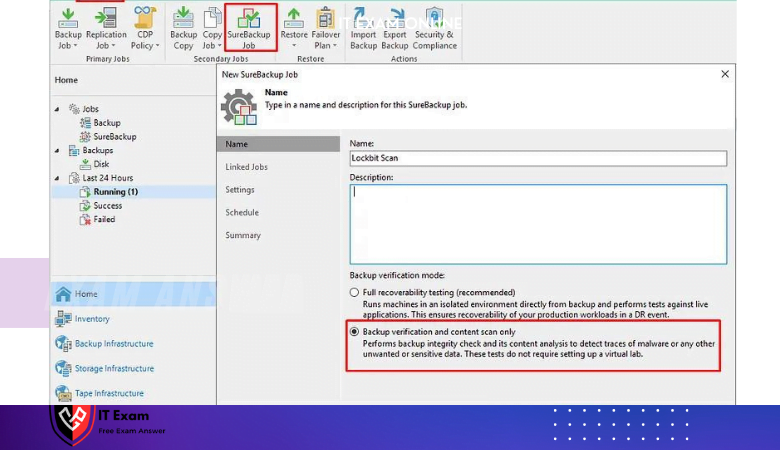
Secure Backup Job under the Home tab in Veeam Console, in the order shown in the picture. Click on
Please enter a name and for a retrospective scan we will simply proceed with the Backup Verification and Content Scanning option.
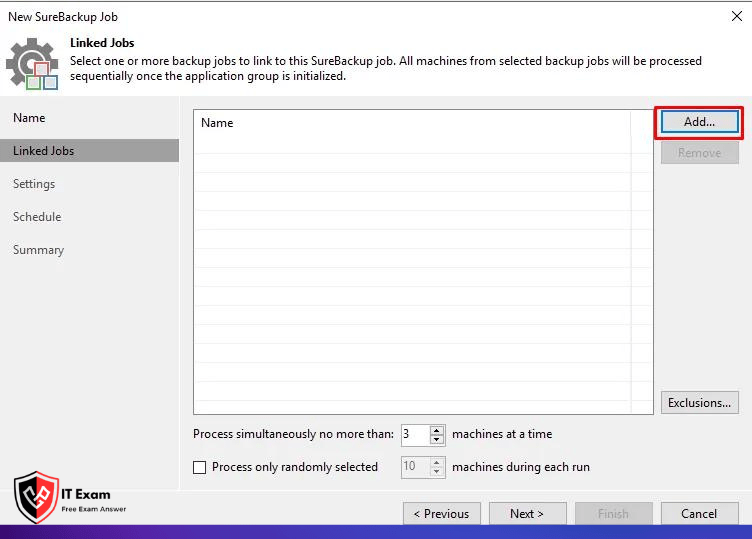
On the screen that opens, select the Backup Job you want to link by pressing the Add button and continue to the next step with the Next button.
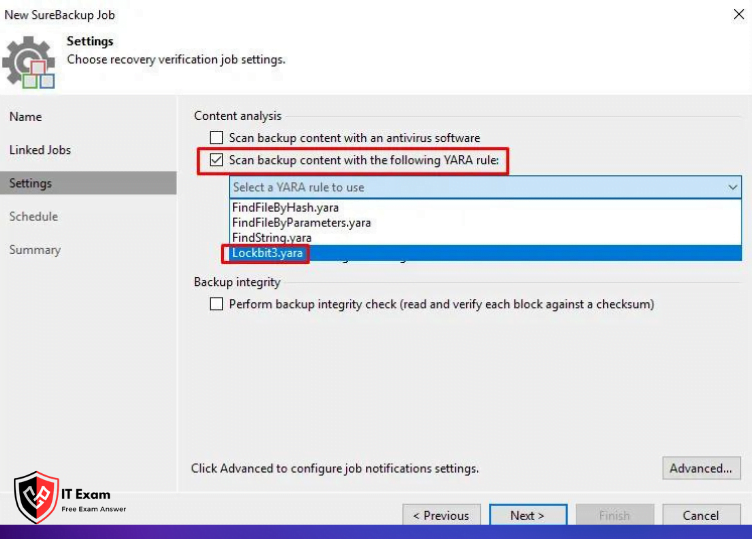
On the screen that appears, activate the Scan backup content with the following YARA rule field and select your YARA rule, which appears with the file name you copied.
Strengthen Your Defense: Veeam Yara Blocks Lockbit 3.0 Attacks!
With the Veeam YARA rule, we can scan with the techniques specified below. You can add the parameters you want to the script, perform a more transitional scan and take different precautions.
Hash Control
Directory Name Check
Hex and ASCII Reviews
File Size Control
Entropy of File Content
Note: If you want to scan faster, you can close the hash field with // as in the example below.
         //$hash0 = "80e8defa5377018b093b5b90de0f2957f7062144c83a09a56bba1fe4eda932ce"
        //$hash1 = "506f3b12853375a1fbbf85c82ddf13341cf941c5acd4a39a51d6addf145a7a51"
        //$hash2 = "d61af007f6c792b8fb6c677143b7d0e2533394e28c50737588e40da475c040ee"
How to Prevent LockBit 3.0 Attack?
Empower Your Defense: Veeam Yara Rules Thwart Lockbit 3.0 Attacks!